X-Start Maintenance
The X-Start Maintenance application runs on the X-Start kiosk terminal, and it's accessible from the X-Start terminal by unlocking the door and logging in. It provides the following tools and functions: networking information, current device statuses, configuration settings, utilities, test functions, and power options (shut down, restart).
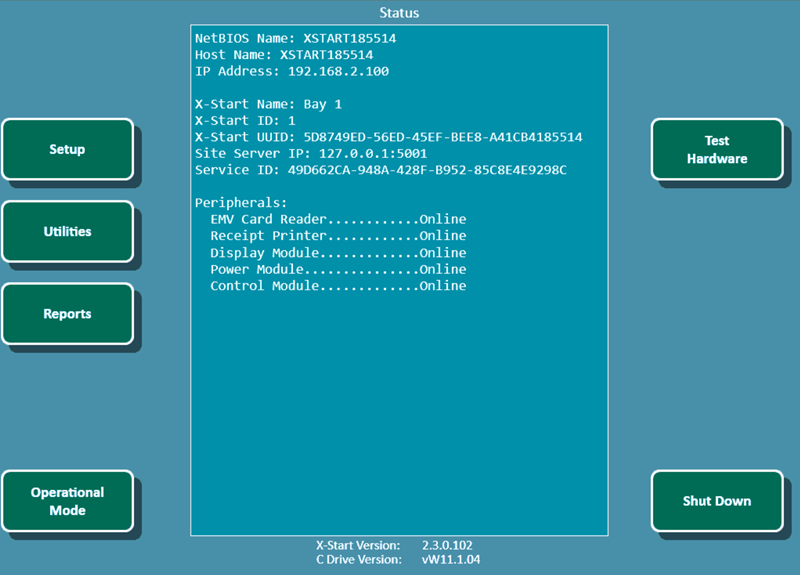
Status
The Status section provides information about the X-Start kiosk terminal, including network information, terminal name, and peripheral statuses.
Peripherals
The Peripherals sub-section provoides the current status of each peripheral. An Online status indicates that the peripheral if enabled and active.
EMV Card Reader
The EMV Card Reader provides the current status of the payment card reader.
Receipt Printer
The Receipt Printer provides the current status of the thermal paper receipt printer.
Display Module
The Display Module provides the current status of the module that controls the screen.
Power Module
The Power Module provides the current status of the module that controls power to the kiosk terminal components.
Control Module
The Control Module provides the current status of the module that manages the wash service outputs.
Setup
The Setup function opens the Management System panel, which contains configuration settings, designate the X-Start as the master, and to run a ping test to the Sierra Server (that’s running on the master X-Start).
Utilities
The Utilities function transfer files to and from a flash drive and to view the X-Start logs.
Reports
The Reports function provides the ability to generate X-Start reports..
Operational Mode
The Operational Mode function closes the X-Start Maintenance application and opens the X-Start Sales application's Welcome screen. The system will remain in the operational mode until it senses the door key switch has been “removed” again, or at the close of the next transaction. A log will be created when the operational mode button is used. Note that the vault door must be closed (not necessarily locked) before the X-Start Sales application can be entered.
Test Hardware
The Test Hardware function opens the screen to test installed devices.
Shut Down
The Shut Down function opens options to restart the X-Start unit, or reload the device profile without having to open the door.
Important: The shut down function should always be used to power off the X-Start.
Updated: 051426