X-Start Watchdog Module
The X-Start Watchdog Module is a standard functionality within the X-Start Power Module. It provides remote power-cycle functionality, as well as the ability to self-heal an X-Start kiosk terminal through automatic power cycles, reducing the instances of an operator/manager/technician having to physically power-cycle the kiosk terminal from the lane. This can reduce support calls and technician service calls, while increasing up-time. The self-healing functionality includes the ability to automatically resolve the following:
- Windows OS lockups or indeterminate states
- Application lockups, crashes, or indeterminate states
- Critical peripheral device lockups or indeterminate states
- Power surges that cause hardware CPU or peripheral lock ups
FAQs
- What benefits does the Watchdog Module provide?What benefits does the Watchdog Module provide?
The Watchdog Module increases the kiosk terminal's uptime. Through self-healing and remote power cycle functionality, it can reduce technician service calls to the site or visits out to the wash from site personal for simple things that might just require a power cycle of the equipment. Since the Watchdog functionality is fully integrated into the custom power supply module, it also is a gateway to future functionality and fault detection/correction with updates.
- How can I tell if the Watchdog Module is working properly?How can I tell if the Watchdog Module is working properly?
If the Watchdog LED on the Power Module is on, it is actively monitoring the health of the SierraX software. If the Server Status green LED is blinking once every 15 seconds, communications between the Power Module and the Director Server are functioning propertly.
- If DirectorX is not configured, will any of the Watchdog Module's functionality work?If DirectorX is not configured, will any of the Watchdog Module's functionality work?
Yes. While the Keep Alive functionality will not work, if the kiosk terminal is physically power-cycled (or power is restored from a power outage), the Watchdog Module will be armed until SierraX fully boots up. So if the kiosk terminal crashes from a power outage or for some reason does not fully boot up, the Watchdog Module will activate and power-cycle the CPU and peripherals 3 times before ending the attempts (and then stay on).
- If the X-Start kiosk terminal doesn't have network connectivity to the internet and the DirectorX server, will the Watchdog Module still function?If the X-Start kiosk terminal doesn't have network connectivity to the internet and the DirectorX server, will the Watchdog Module still function?
Yes. If credentials are configured in SieraX, all of the Watchdog module's functionality (other than the server connected features (Remote Reboot)) will function. Keep Alive time outs and any UX crash will still initiate a reboot/power-cycle of the CPU and peripherals.
- Can an off-the-shelf device that provides the ability to power cycle other equipment or older kiosk terminals perform the same functions as the Watchdog Module?Can an off-the-shelf device that provides the ability to power cycle other equipment or older kiosk terminals perform the same functions as the Watchdog Module?
No. The Watchdog Module is more than just a remote power-cycle device. It is fully integrated into the kiosk terminal, monitoring it 24 hours a day. It detects any kiosk terminal software or hardware crash before site staff, and automatically attempts to self-heal. Although the current software is not aware of all possible failures, because the hardware is fully integrated, future software enhancements can provide greater functionality that third-party power-cycling devices can not.
- DirectorX credentials are set up in the X-Start, but the Server Status red LED is still blinking every 15 seconds - why?DirectorX credentials are set up in the X-Start, but the Server Status red LED is still blinking every 15 seconds - why?
This can be normal when first setting up a new kiosk terminal or a replacement kiosk terminal hard drive. DirectorX will often take time to sync with the kiosk terminal in order to put the device information into its database and start responding to Server messages from the Power Module. Often, a transaction at the kiosk (wash purchase) can jump start this process. If that does not work, review the network for issues, and verify the router can view the Power Module on its DHCP client list (check for a device that starts with DRB-XXXXXXXX).
Hardware Connections
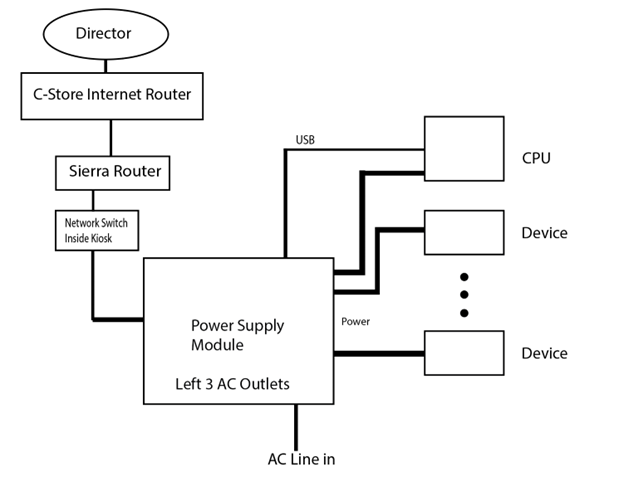
- LAN Ethernet Connection for Connection to Cloud service (Director)
- USB Connection to CPU board (for protocol coms and firmware update)
Hardware Devices for User Interaction
Push Switch to disable/bypass Watchdog Keep Alive restart functionality as well as persistent disable and Power Module firmware settings reset (factory default)
- LEDs indicating current Watchdog Status (on or off)
- LEDs indicating Director/Cloud interface status
Connection to Sierra
The Power Module has a USB connection to the CPU module. It communicates via a proprietary protocol to the SierraX kiosk application. The SierraX application is responsible for configuring the Watchdog parameters in the Power Module on power up. Configuration settings include:
- Watchdog enable/disable
- Director credentials for the X-Start
- Watchdog Keep alive Timeout value (length of time before a failed message from SierraX to the Power Module will cause a power cycle)
- Keep Alive message (periodic messages from SierraX to Power Module to indicate health of the SierrraX kiosk application)
Note: SierraX will send the Keep Alive message to the Power Module every 2.5 minutes. The watchdog could reset the power anywhere from 7.5 - 10 minutes after an OS lockup or SierraX crash.
Note: The Watchdog Module will automatically enable itself on power up. If SierraX does not finish initializing and start sending the Keep Alive message over the USB, the Watchdog will power cycle in 10 minutes, up to 3 times before stopping and remaining powered up.
Connection to Director
A Director account is required to properly set up the Watchdog functionality of the Power Module. With a valid Director account set up in SierraX, SierraX will send Director credentials to the Power Module upon every start up. The Power Module will retain these credentials and communicate with Director every 15 seconds. It will also do this when the X-Start is power-cycled and communicate even if SierraX is not running. Director has the ability to reboot any X-Start configured in Director. Remote Reboot from Director will work even if the Watchdog is temporarily disabled. A remote reboot typically will initiate within 15 seconds of the Director Reboot function, if there is power to the X-Start and network components are all online to the internet.
The network link typically starts communicating within 1 minute after the following error conditions are corrected:
- Internet outage (C-Store internet back online)
- Ethernet unplugged at Power module or Network Switch
Power Outages
If there is a site wide or building wide power outage, it may take up to 5 minutes for devices, including the Power Module, to communicate back to Director over the internet. This primarily depends on the DRB router and store network router boot up times.
Watchdog LED and button
Disable Watchdog (temporary) Pressing the button for 1 second will toggle the Watchdog from being enabled or disabled. Green WD LED displays the WD active/inactive state. Director messages if credentials were sent to the PM will still function, Power Cycling will re-enable and restarting Sierra will set it to the value configured in Sierra
Factory Defaults Pressing the button and holding for 20 seconds, the LED will flash 1 time a second (1/2 second off, ½ second on), the Watchdog will be enabled (which is factor default contion) In addition, the Director credentials saved will be cleared out and it will not connect to Director until new credentials are sent via Sierra which is typically when SierraX restarts the GUI. When SierraX sends credentials on a start up, the defaults are over written so that on each power up, Power module will start talking to Director right away.
LED Lights
The Watchdog module provides LED status lights that provide information for its various monitoring functions, including voltages, heater, blower, surge protection, reset functions, lighting, USB communications, and server communications.
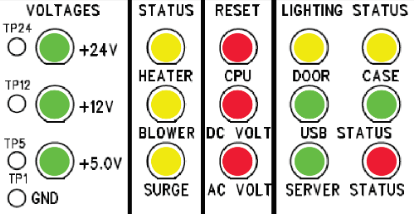
VOLTAGES
Voltage lights for the Power supply voltages show that the voltages are within 5% of designed regulation. Note that all of the Modules run off of 12V but if the 12V power has failed, the Power Module processor board will automatically switch to use the 24V power supply(if it is working) and continue to display valid LED conditions as well as communicate with Director even though the Kiosk itself will not function because the CPU module will not get power.
STATUS
The STATUS column of LEDs provides information for the Watchdog module's heater, blower, and surge functions.
HEATER
LED indicates the internal heater is activated.
BLOWER
LED indicates the internal ambient air filtered fan is activated.
SURGE
LED indicates the surge plug in module has failed (likely due to a surge so high it damaged the protection components).
RESET
The RESET column of LEDs provides information for the Watchdog Module's CPU, DC voltage, and AC voltage functions.
CPU
LED indicates the Watchdog is resetting the CPU module.
DC VOLT
LED indicates the Watchdog is resetting the 12 & 24V devices which include the Control and Display modules, the EMV reader, Printer and optional peripherals.
AC VOLT
LED indicates it is resetting the 3 left AC outlets (The right AC outlet is not switched by the Watchdog, it always powered when Power Module is on).
LIGHTING STATUS
The LIGHTING STATUS columns of LEDs provide information for the Watchdog Module's door lighting, case lighting, USB, and communications functions.
Door (Yellow)
- On: Door lighting is active.
- Off: Door lighting is inactive.
Case (Yellow)
- On: Halo lighting is active.
- Off: Halo lighting is inactive.
USB Status
Alternating blinking : connected to CPU module.
Left (Green)
- Off : Disconnected from CPU Module
Right (Green)
- Off : Disconnected from CPU Module
- Both Flashing fast at same time: Suspend mode (Windows rebooting)
Server Status
The Power Module communicates to Director once every 15 seconds to determine whether Director wants the Watchdog to reset the Power Module outputs. If the message goes through successfully, Server Status GREEN LED will blink . If there is a problem, it will flash RED. It is not uncommon for periodic Red flashes from time to time as long as most all >90% are Green.
When installing a site for the first time, and the Director credentials are first entered, you will need to perform a reload (Device upload from Web pages or Maintenance Mode Reload from the Shutdown menu) for the new credentials to load into the power module. On first Director installation, until a transaction is performed on the kiosk or waiting up to an hour for a “phone home” to director by Sierra, the Status LED may stay red. This is normal. If it is continually RED, then there is a configuration problem or a network problem.
Watchdog Module Block Diagram
Updated: 042726